
Have you heard about NotebookLM? A Tool for Research, Note-Taking, and Content Creation
In today’s world, staying on top of information and trying to make sense of huge amounts of text can be overwhelming. If you are a student, professional, or content creator, staying on top of research, summarizing documents, or creating new content takes time. What if it could all be done more intelligently? Say hello to NotebookLM, the software that’s changing how we research, take notes, and even create content.
What is NotebookLM?
NotebookLM, developed by Google Labs is a next generation research tool designed to make working with documents simpler. It offers a set of features that enable you to take in and digest enormous amounts of information within minutes, while simultaneously making learning more interactive and dynamic.
It was launched in 2023 as Project Tailwind, NotebookLM uses cutting-edge technology to allow you to interact with your documents in previously unimaginable ways. If you are summarizing documents, providing lengthy responses, and even generating podcasts, it’s proving to be a game-changer for both individuals and companies.
Watch this video to learn more:
A New Way to Work with Documents
One of the best things about NotebookLM is that it is able to take complex documents, such as research papers, books, or business reports, and summarize them in a way that is simple to read. If you’re preparing for an exam or planning for your company, this feature allows you to avoid having to read through pages of material just to get to the key points.
NotebookLM can highlight major topics, provide brief summaries, and offer direct answers to questions about the content you’ve added. That’s more time understanding and less time reading and there is more. “NotebookLM’s interactive Q&A functionality” allows you to engage with the tool in a conversational way.
You can ask questions regarding specific sections of a report, and the system will give you precise responses based on the material you have loaded. Just imagine having your personal assistant on hand to resolve whatever questions you may have, this is what NotebookLM is able to achieve.
Introducing the Audio Overviews
Now here’s where it gets cool. NotebookLM has introduced “Audio Overviews”, a feature that lets you convert written content into audio but this is not a simple voice reading of the content, it’s a full-fledged conversational podcast, where AI-powered hosts discuss the content in a fun and easy to understand format. You can think of it as having your own personal podcast summarizing your research, with engaging dialogue and insights.
The greatest aspect of this feature is that it is perfect for audio learners or individuals on the go. You may be driving to work, exercising, or just relaxing, you can listen to these summaries and learn while doing other tasks. It turns learning and getting informed into not only a easier task but also a more enjoyable one. Imagine listening to a summary of your latest research paper as you head out for an early morning run, it’s a great way to enhance productivity without taking away from your day.
How to Talk with Podcast Hosts in NotebookLM, check this out:
Read also: Xiaomi 15 Ultra Officially Revealed
Creating Your Own Personalised Podcasts
NotebookLM takes it a step further and allows you to create your own personalised podcasts. Simply upload your documents, either PDFs, Google Docs, or even web pages, and the tool will generate a bespoke audio summary. However, if you want to get a bit more creative, you can personalise the podcast to discuss specific sections, highlight key points, or even adopt a specific tone.
This level of personalisation really does make it your own way of taking in information. After the audio is ready, you can listen to it, edit it if necessary, and even download it so that you can share it with others or upload it onto podcast platforms. It’s a pretty neat way of rewriting your written content and sharing it in a new and engaging format. For content creators or professionals looking to engage their audience in newer ways, this tool is a total game-changer.
NotebookLM Plus
For those users who want even more out of NotebookLM, though, there’s the “NotebookLM Plus” version. It was launched in December of 2024, this premium version offers more expanded features, including higher usage limits, greater customization control, and even the ability for teamwork on shared team notebooks. With NotebookLM Plus, you can even have more advanced privacy and security features, making it the perfect tool for businesses and teams that need a reliable, high-performance tool to manage large-scale projects.
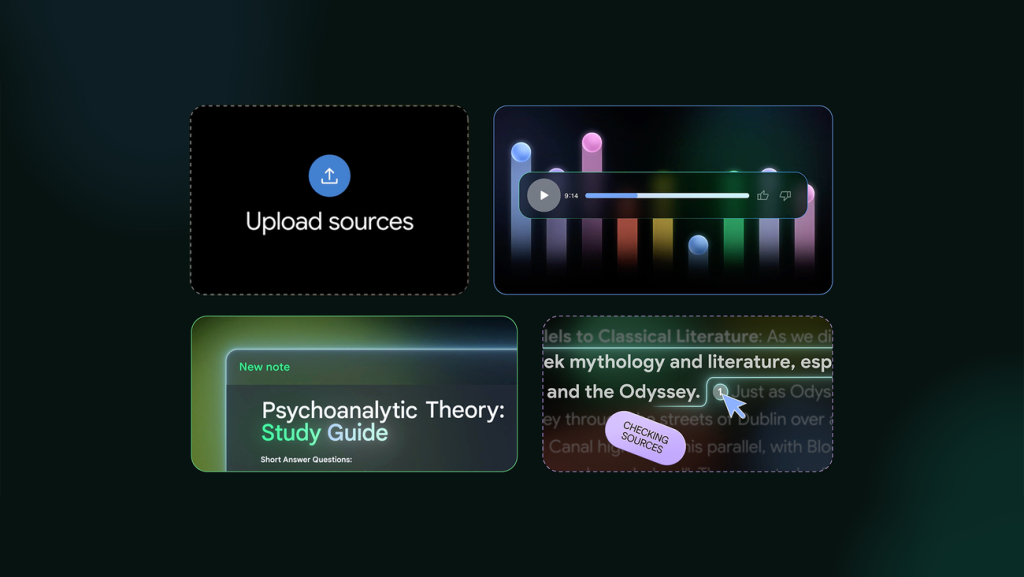
It cannot get any simpler than working with NotebookLM. Just log in using your Google account to get started. Then, open a new notebook and import your documents, whether they are text-heavy PDFs, Google Docs, or even web pages. You can upload up to 50 sources, NotebookLM is good to go! From there, you can interact with the material, pose questions, or summarize.
If you need to create new content? No problem, just head over to the Studio panel, and you can easily make study guides, briefing documents, or any other type of resource you need.
If you’re feeling adventurous, try the Audio Overviews, with a click of a button, you can generate a podcast style summary of your notes and if the first attempt is not quite right, you can tweak it to perfection. NotebookLM’s versatility makes it easy to fit into your daily routine, enhancing both learning and productivity.
Who Can Benefit from NotebookLM?
Students will find NotebookLM to be a lifesaver for exam preparation and studying, as it can help condense heavy textbooks and lecture notes into compact, easily consumable material. Professionals, on the other hand, can summarise meeting transcripts, research papers, or industry reports in lightning speed, staying on top of trends and developments without working up a sweat and content creators can use the platform to transform written blog posts or articles into interesting audio material, reaching out to an entirely new segment of audience.
In short, NotebookLM is not just a tool, it’s a revolution in content creation and information processing. Studying, working, or creating, NotebookLM offers a faster, better way of working with information.
So, having heard of NotebookLM, if you’re the kind of individual who must deal with massive amounts of information or needs to stay current with research, then the time has come to take a glance at it. From its document summarisation, personalized podcasts, and transforming the way you interact with content, NotebookLM is productivity reimagined for the future.
Don’t just take our word for it, try it for yourself and see how NotebookLM can change how you get work done.
Step by Step Guide to Access and Use NotebookLM
Now that you understand what NotebookLM is, here’s how to begin and get the most out of it:
- Access NotebookLM
- Visit (https://notebooklm.google) in your preferred web browser.
- Sign in with your Google account (If you don’t already have one, you can create a new Google account for free).
2. Create a New Notebook
- Once you’ve signed in, you’ll be taken to the primary dashboard.
Click on the “Create New” or “New Notebook” button to start a new project.
3. Add Your Sources
- To start your notebook, upload documents that pertain to the work you want to summarise or interact with. Upload files in the format of PDFs, Google Docs, URLs, or even YouTube videos.
- Drag and drop files from your computer or select them directly from Google Drive.
4. Review and Organise Your Sources
- Your uploaded documents will appear on the left-hand sidebar. Here, you can check or uncheck documents to be included or excluded from your analysis. It is good practice to go through your sources and organise them before you continue.
5. Engage with Your Notebook
- Move to the “Chat panel”, where you can pose questions or ask for summaries of your uploaded content or, move to the “Studio panel” to create new content such as study guides, briefing papers, or other documents based on your sources.
6. Create Audio Overviews
- To turn your content into an audio podcast, move to the “Notebook Guide” and click on “Generate” in the Audio Overview section.
- Permit the processing time. The time will vary in relation to how complicated your documents are.
7. Customise Your Audio (Optional)
- To create changes to the output, select “Customize” instead of “Generate”. Here, you can add special instructions, such as focusing on particular topics or adopting a particular tone.
8. Listen and Share
- Once the audio is ready, you can listen to the generated podcast. If it needs changes, simply make enhancements to your input and regenerate it. Finally, you can download your audio file and share it directly or upload it to podcasting websites for wider distribution.
By following these steps, you can easily get started with NotebookLM and begin using its full features for all your research, note-taking, and content creation needs.
Read also: How People Are Using Grok 3 -The World’s Smartest AI